Connections and timeouts
Use this page when an HSMS connection doesn’t come up or a request ends with a timeout. All output and log records on this page come from real runs of the tutorial peers. The logs are diagnostics logs (JSONL) written with PDCOMM_LOG=debug. To keep them readable, each record here shows only level, component, event, and fields; real records also carry fields such as timestamp_unix_ms, instance_id, and sequence. To turn the log on, see Diagnose failures and send feedback.
For the HSMS states and timers themselves, see HSMS.
Connection steps and timers
Section titled “Connection steps and timers”Active (Host) Passive (Equipment) | TCP connect ------------------------> | on failure: RetryWait, reconnect after T5 | Select.req -------------------------> | Select.rsp must arrive within T6 | <------------------------ Select.rsp | Selected (within T7 of the TCP connect) | S1F13 (W) --------------------------> | S1F14 must arrive within T3 | <----------------------------- S1F14 | Communicating| Timer | What it limits | When it expires, PDComm | What the log shows |
|---|---|---|---|
| T3 | The wait for a reply to a data message | ends that request with FAILED (reason 2). The connection stays up. |
transaction_failed with T3Timeout |
| T5 | The pause between a disconnect and the next connect (active side only) | moves from RetryWait to Connecting and reconnects with a new generation. |
state_changed from RetryWait to Connecting |
| T6 | The wait for a reply to Select, Deselect, or Linktest | ends that request with FAILED (reason 3) and drops the connection. |
transaction_failed with T6Timeout |
| T7 | The time from TCP connect to Selected | drops the connection. There’s no failure code of its own. | state_changed from NotSelected to RetryWait or Listening |
| T8 | The gap between bytes of one message | drops the connection. There’s no failure code of its own. | state_changed, plus Disconnected for pending requests |
When the connection drops, every pending request ends with FAILED (reason 4, Disconnected). After a reconnect, the generation number goes up by one, and tokens or events from the earlier generation return StaleToken. GEM communication also starts over, so the host must send S1F13 again.
Choose timer values
Section titled “Choose timer values”Set timers and limits in PdcommTcpOptions (.NET: HsmsOptions), in milliseconds. A zero timer is rejected with InvalidArgument. PDComm has no built-in defaults.
- When you connect to real equipment, use the values from the equipment’s GEM manual or interface specification. When both sides use the same values, failures are much easier to explain.
- Make T3 longer than the slowest reply the peer can send. Large messages, such as process program transfers, take longer.
- A very short T5 floods a peer that isn’t ready yet with connection attempts.
- Make T8 comfortably longer than the jitter of your network.
The tutorial peers use short values so that failures show up quickly on one computer. Don’t copy them to real equipment. The headless simulator’s external-peer scenario, which talks to an outside program, uses longer values.
| Option | C++ tutorial | C# tutorial | headless external-peer |
|---|---|---|---|
T3 (t3_ms, T3Milliseconds) |
5000 | 2000 | 45000 |
T5 (t5_ms) |
1000 | 20 | 10000 |
T6 (t6_ms) |
2000 | 2000 | 5000 |
T7 (t7_ms) |
2000 | 5000 | 10000 |
T8 (t8_ms) |
1000 | 2000 | 5000 |
Connect attempt (connect_timeout_ms) |
20 | 100 | 10 |
Write (write_timeout_ms) |
2000 | 2000 | 5000 |
connect_timeout_ms is the time one connect attempt on the active side may take; a poll call can block for that long. When a write doesn’t finish within write_timeout_ms, you get a TRANSPORT_ERROR with operation Write and kind TimedOut.
Option code of the tutorial peers
#pragma once#include "pdcomm_gem.hpp"namespace tutorial {PdcommSecsLimits itemLimits() {    return pdcomm::secsLimits(4096, 4096, 128, 8);}
PdcommTcpOptions tcpOptions(uint32_t mode) {    PdcommTcpOptions value = {};    value.struct_size = sizeof(value);    value.version = PDCOMM_TCP_OPTIONS_VERSION;    value.mode = mode;    value.session_id = 7;    value.initial_system_bytes = 100;    value.t3_ms = 5000;    value.t5_ms = 1000;    value.t6_ms = 2000;    value.t7_ms = 2000;    value.t8_ms = 1000;    value.connect_timeout_ms = 20;    value.shutdown_timeout_ms = 200;    value.write_timeout_ms = 2000;    value.max_frame_bytes = 4110;    value.max_events = 96;    value.max_queued_bytes = 32768;    value.max_write_frames = 8;    value.max_write_bytes = 16384;    value.max_io_chunk = 4096;    value.max_application_events = 96;    value.max_application_bytes = 32768;    value.poll_budget = 16;    value.item_limits = itemLimits();    return value;}
}using PDComm;internal static class TutorialOptions{ internal static readonly SecsLimits Limits = new(8192,4096,512,24); internal static GemFormattedProgramConfiguration Configuration() => new( new(4, 128, 512, 8, 8, 16, 32), new(4, 4, 8, 1024, 8, 8, 16, 32), new(4, 4, 8, 1024, 8, 2048, 8, 8, 16, 32), new(4, 4, 8, 1024, 8, 8, 16, 32), new(4, 32, 4, 8, 4, 32, 1024, 4096, 8, 8, 16, 32), new(4, 128, 512, 8, 8, 8, 16, 32)); internal static GemFormattedProgramCapabilityCommand Capability() => new("RUN", "Run", true, 0, [], [], [], 0, [], [], []); internal static HsmsOptions Transport(HsmsMode mode) => new() { Mode = mode, SessionId = 7, InitialSystemBytes = 1, T3Milliseconds = 2000, T5Milliseconds = 20, T6Milliseconds = 2000, T7Milliseconds = 5000, T8Milliseconds = 2000, ConnectTimeoutMilliseconds = 100, ShutdownTimeoutMilliseconds = 1000, WriteTimeoutMilliseconds = 2000, MaxFrameBytes = 8206, MaxEvents = 128, MaxQueuedBytes = 65536, MaxWriteFrames = 64, MaxWriteBytes = 65536, MaxIoChunk = 4096, MaxApplicationEvents = 128, MaxApplicationBytes = 65536, PollBudget = 32, ItemLimits = Limits }; internal static GemHostOptions HostOptions() => new() { MaxPendingIds = 64, ItemLimits = Limits }; internal static GemEquipmentOptions EquipmentOptions() => new() { Model = "PDComm", SoftwareRevision = "0.1.0", InitialControl = GemControlState.HostOffline, OnlineMode = GemOnlineMode.Remote, MaxVariables = 8, MaxMetadataBytes = 1024, MaxValueBytes = 8192, ItemLimits = Limits }; internal static HsmsWorkerOptions WorkerOptions() => new() { CommandCapacity = 32, MaxCommandBytes = 65536, EventCapacity = 32, MaxEventBytes = 131072, PollIntervalMilliseconds = 1, ShutdownTimeoutMilliseconds = 2000 };}Connection refused
Section titled “Connection refused”Symptom: The active side keeps printing STATE tcp=5 gem=0 (RetryWait).
If you point a host at a port where nothing listens, the log shows the following. The host reconnects every T5 (1 second here) and increases the generation each time.
{"level":"info","component":"hsms","event":"state_changed","fields":{"connection_id":1,"detail":{"from":"Stopped","to":"Connecting"},"generation":1}}{"level":"error","component":"hsms","event":"transport_error","fields":{"connection_id":1,"detail":{"error_kind":"ConnectionRefused","generation":1,"operation":"Connect"},"generation":1}}{"level":"info","component":"hsms","event":"state_changed","fields":{"connection_id":1,"detail":{"from":"Connecting","to":"RetryWait"},"generation":1}}{"level":"info","component":"hsms","event":"state_changed","fields":{"connection_id":1,"detail":{"from":"RetryWait","to":"Connecting"},"generation":2}}{"level":"error","component":"hsms","event":"transport_error","fields":{"connection_id":1,"detail":{"error_kind":"ConnectionRefused","generation":2,"operation":"Connect"},"generation":2}}Your application receives a TRANSPORT_ERROR event with operation 3 (Connect) and kind 3 (Refused). Some operating systems report another kind, such as TimedOut. In the simulator GUI, the Application activity table of the Diagnostics dock shows TCP connect failed: connection refused just before TCP state: Connecting -> RetryWait. Windows reports a refused connection to a closed loopback port only after retrying for about two seconds, so the connect timeout can expire first and the row reads TCP connect failed: timed out.
What to check
- The passive program runs and printed
LISTENwith the same port. - A passive side bound to
127.0.0.1can’t accept connections from other computers. Bind it to the network address instead. - No firewall blocks the port.
- Both sides aren’t active. Two active sides never connect, because nobody listens.
Port already in use
Section titled “Port already in use”Symptom: The passive program exits right after it starts. A passive endpoint binds its port when you create it, so pdcomm_tcp_create returns PDCOMM_IO_ERROR. No event is produced.
If you start a second equipment on the same port, the C++ peer prints the following and exits with code 1:
PDComm native operation failedThe C# peer prints this exception:
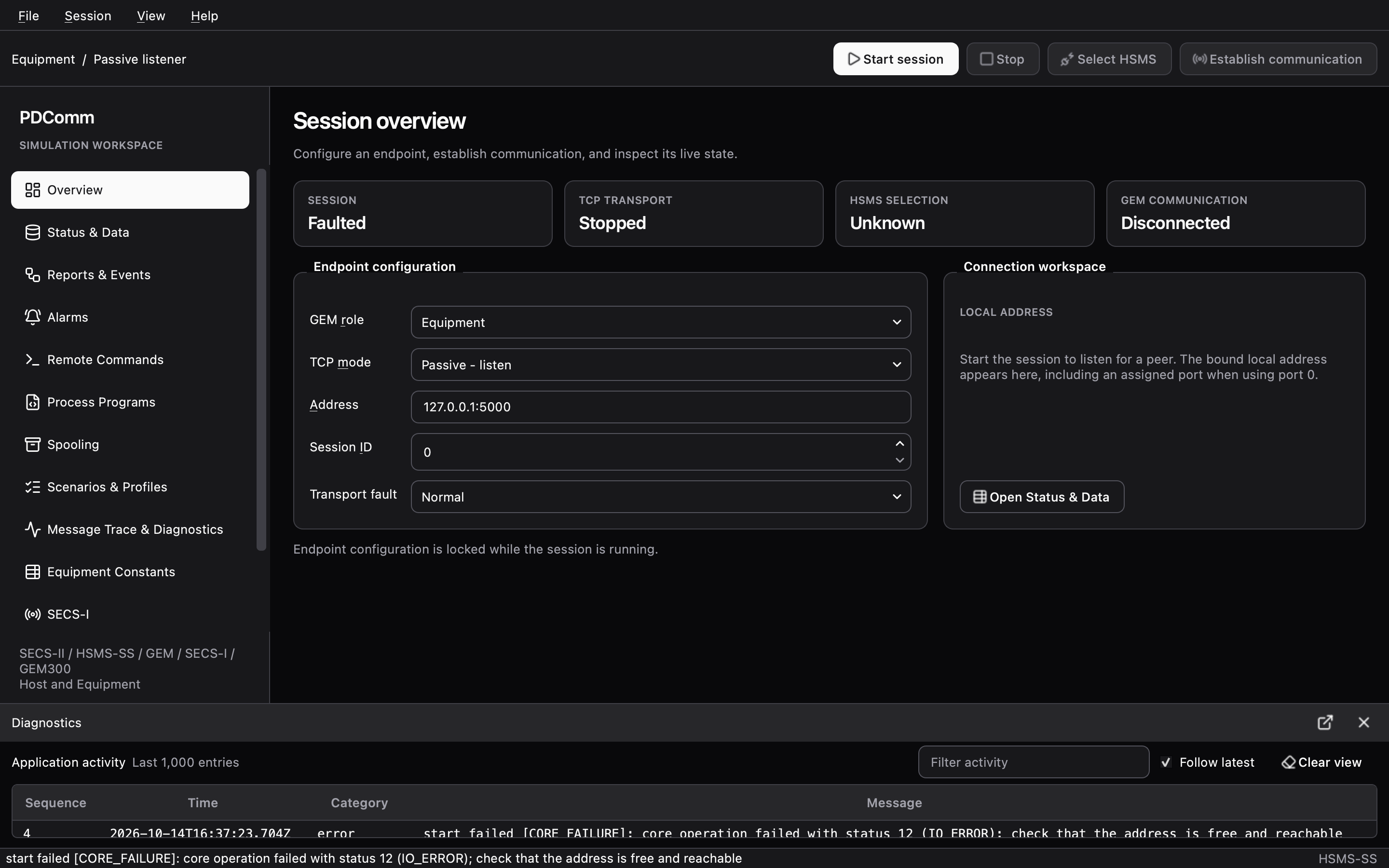
PDComm.PdcommException: PDComm native operation failed with status IoError.In the simulator GUI, Start session turns the SESSION card to Faulted, and the status bar and the Application activity list of the Diagnostics panel show this message:
start failed [CORE_FAILURE]: core operation failed with status 12 (IO_ERROR); check that the address is free and reachable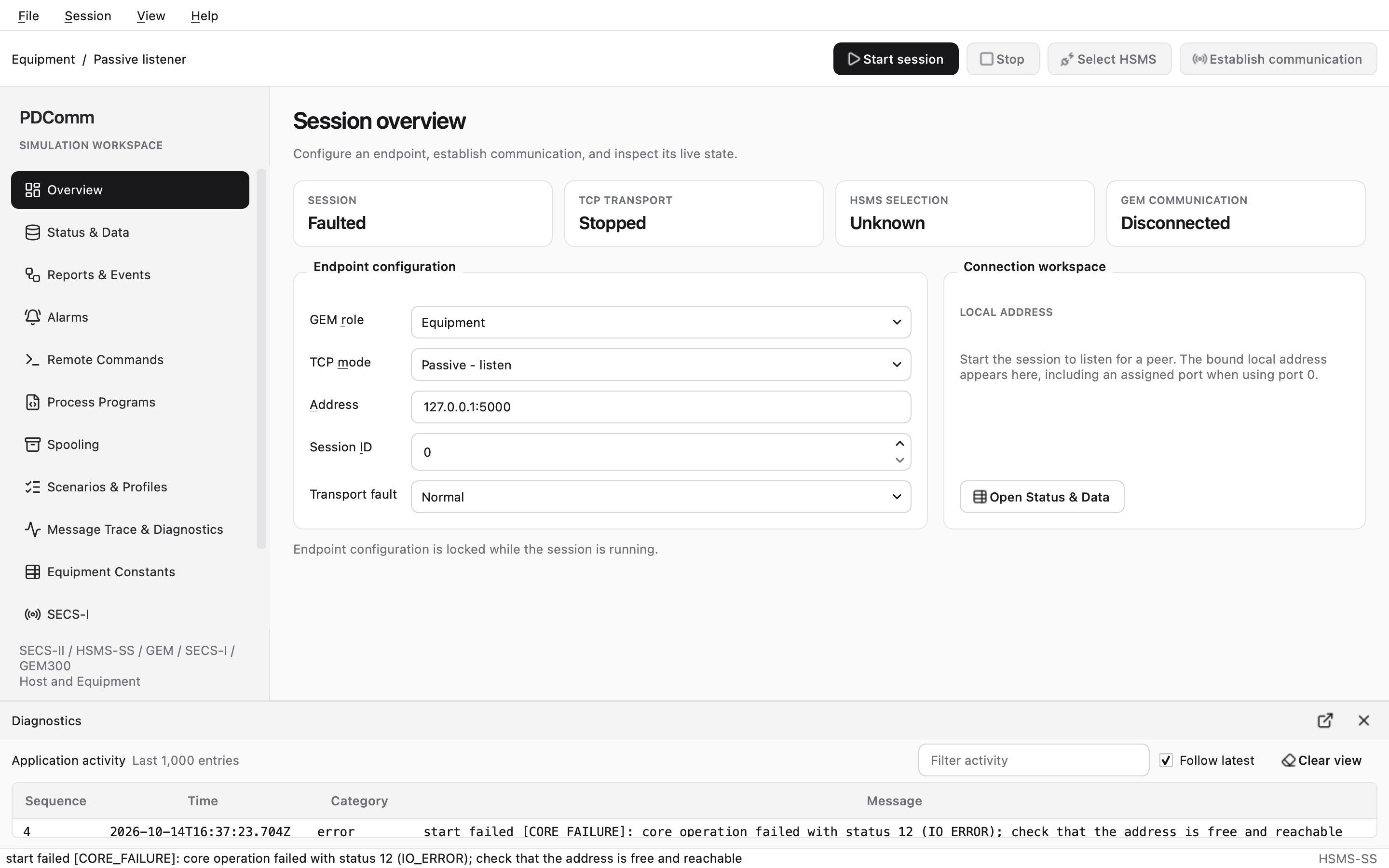
What to check: Find the program that owns the port.
lsof -nP -iTCP:5000 -sTCP:LISTENGet-NetTCPConnection -LocalPort 5000 -State ListenOn macOS, the AirPlay Receiver in Control Center listens on port 5000 on every address (*:5000). The lsof command above shows a ControlCe process:
COMMAND PID USER FD TYPE DEVICE SIZE/OFF NODE NAMEControlCe 1305 user 11u IPv4 0x32a01e9144f8b294 0t0 TCP *:5000 (LISTEN)You can still bind 127.0.0.1:5000, but 0.0.0.0:5000 fails. Use another port, or turn off AirPlay Receiver in System Settings > General > AirDrop & Handoff.
TCP connects but never becomes Selected
Section titled “TCP connects but never becomes Selected”Symptom: The active side stays at STATE tcp=3 gem=0 (NotSelected), then drops the connection and reconnects.
If the peer accepts the TCP connection but never answers Select.req, the log shows the following. After T6 (2 seconds here) the host drops the connection and reconnects after T5.
{"level":"info","component":"hsms","event":"state_changed","fields":{"connection_id":1,"detail":{"from":"Connecting","to":"NotSelected"},"generation":1}}{"level":"error","component":"hsms","event":"transaction_failed","fields":{"connection_id":1,"detail":{"generation":1,"reason":"T6Timeout","system_bytes":100},"generation":1}}{"level":"info","component":"hsms","event":"state_changed","fields":{"connection_id":1,"detail":{"from":"NotSelected","to":"RetryWait"},"generation":1}}{"level":"info","component":"hsms","event":"state_changed","fields":{"connection_id":1,"detail":{"from":"RetryWait","to":"Connecting"},"generation":2}}What to check
- The port belongs to an HSMS server. Other kinds of servers accept TCP connections too.
- No other host already uses the equipment. See the next section.
- If the peer is too busy to answer within T6, increase T6.
Equipment already serves another host
Section titled “Equipment already serves another host”One HSMS-SS connection carries exactly one host. A PDComm passive endpoint doesn’t accept a new connection while it has one. The second host’s TCP connect completes in the operating system’s queue, but no HSMS answer comes back, so T6 expires.
If you connect a second host to tutorial equipment that already talks to a first host, the second host prints STATE tcp=3 gem=0, and its log shows this:
{"level":"info","component":"hsms","event":"state_changed","fields":{"connection_id":1,"detail":{"from":"Connecting","to":"NotSelected"},"generation":1}}{"level":"error","component":"hsms","event":"transaction_failed","fields":{"connection_id":1,"detail":{"generation":1,"reason":"T6Timeout","system_bytes":100},"generation":1}}{"level":"info","component":"hsms","event":"state_changed","fields":{"connection_id":1,"detail":{"from":"NotSelected","to":"RetryWait"},"generation":1}}Equipment built on other implementations may answer Select.req with status 1 (already active) instead. You then get FAILED with reason 7 (SelectStatus) and value1 set to 1, and the log reason reads SelectStatus(1).
Fix: End the first host’s connection before you connect. If one equipment needs several hosts, check whether it offers more ports or sessions.
Select status and Reject reasons
Section titled “Select status and Reject reasons”SEMI E37 defines these Select.rsp status values (SEMI E37, Select procedure):
| Status | Meaning | PDComm |
|---|---|---|
| 0 | Communication established | A passive endpoint sends it for a normal Select. |
| 1 | Communication already active | Sent when the endpoint is already Selected. |
| 2 | Connection not ready | Never sent. |
| 3 | Connect exhaust | Never sent. |
When PDComm receives a nonzero status, it reports FAILED with reason 7 and stays in NotSelected. After T7 it drops the connection and tries again.
PDComm sends Reject.req with these reasons:
| Reason | Meaning | When PDComm sends it |
|---|---|---|
| 1 | SType not supported | It received an unknown message type. |
| 2 | PType not supported | It received a body format other than SECS-II. |
| 3 | Transaction not open | It received a Select.rsp, Deselect.rsp, or Linktest.rsp it didn’t ask for. |
| 4 | Entity not selected | It received a data message while not Selected. |
When the peer rejects one of your messages with Reject.req, you get FAILED with reason 6; value1 holds the rejected type and value2 the reason.
When PDComm receives Deselect.req, it answers with status 0, ends pending requests with FAILED (reason 5, Deselected), and returns to NotSelected. When it receives Separate.req, it drops the connection. When your application stops a Selected endpoint, PDComm sends Separate.req and ends pending requests with FAILED (reason 1, Cancelled).
Session ID mismatch
Section titled “Session ID mismatch”Symptom: The state reaches tcp=4 (Selected), but S1F13 fails without a reply.
HSMS-SS control messages such as Select use session ID 0xFFFF, so Select succeeds even when the session IDs differ. Data messages, however, are dropped by the receiver. When the tutorial host (session ID 7) talks to equipment set to session ID 8, the host prints this after T3 (5 seconds):
RESULT kind=3 request=1 outcome=0STATE tcp=4 gem=1The equipment log records that it dropped the message:
{"level":"error","component":"hsms","event":"protocol_error","fields":{"connection_id":5,"detail":{"error":"WrongSession { expected: 8, received: 7 }","generation":1,"system_bytes":101},"generation":1}}The host log records the T3 timeout:
{"level":"error","component":"hsms","event":"transaction_failed","fields":{"connection_id":1,"detail":{"generation":1,"reason":"T3Timeout","system_bytes":101},"generation":1}}Fix: Use the same session ID on both sides. The tutorial peers use 7. The simulator GUI’s Session ID defaults to 0, so set it to 7 before you connect a tutorial peer.
T3 reply timeout
Section titled “T3 reply timeout”Symptom: A request ends with RESULT kind=3 (Failed), and the log reason is T3Timeout.
You can reproduce a T3 timeout yourself with three macOS or Linux terminals:
-
In terminal A, start the equipment:
터미널 창 "$PDCOMM_ROOT/bin/pdcomm-tutorial" equipment passive 127.0.0.1:5000 -
In terminal B, start the host with logging turned on, and type
establish:터미널 창 mkdir -p logsPDCOMM_LOG=debug PDCOMM_LOG_FILE=./logs/host.jsonl "$PDCOMM_ROOT/bin/pdcomm-tutorial" host active 127.0.0.1:5000 -
In terminal C, pause the equipment process:
터미널 창 kill -STOP $(pgrep -f 'pdcomm-tutorial equipment') -
In terminal B, type
values 1 2. After 5 seconds, the T3 of the C++ tutorial, the host prints:RESULT kind=3 request=3 outcome=0 -
In terminal C, let the equipment run again:
터미널 창 kill -CONT $(pgrep -f 'pdcomm-tutorial equipment')The equipment now handles the S1F3 it received while paused and sends a late S1F4.
-
In terminal B, type
values 1 2again. This time you getRESULT kind=2 request=3 outcome=5. The connection never dropped.
Check the log:
grep -E '"event":"(transaction_failed|protocol_error)"' ./logs/host.jsonl{"level":"error","component":"hsms","event":"transaction_failed","fields":{"connection_id":1,"detail":{"generation":1,"reason":"T3Timeout","system_bytes":102},"generation":1}}{"level":"error","component":"hsms","event":"protocol_error","fields":{"connection_id":1,"detail":{"error":"UnexpectedReply","generation":1,"system_bytes":102},"generation":1}}The first record says that the request with system bytes 102 got no reply within T3. The second says that the late reply with the same system bytes arrived after its transaction had closed, so the host dropped it.
Common causes
- The peer doesn’t handle the message and sends no reply. See Unhandled messages and S9.
- The session IDs differ. See Session ID mismatch.
- The peer takes longer than T3. Increase T3 to match the peer’s specification.
- The peer application doesn’t take and handle events. PDComm has no internal threads, so replies go out only while the application keeps calling poll and handling events.
S1F13 fails
Section titled “S1F13 fails”When S1F13 gets no reply within T3, the result is RESULT kind=3 request=1 outcome=0, and GEM communication returns to NotCommunicating (1). When the peer denies it with COMMACK 1, the result is RESULT kind=2 request=1 outcome=3 (CommunicationRejected), and the state also returns to NotCommunicating.
PDComm doesn’t resend S1F13 by itself. Fix the cause, then call pdcomm_gem_begin_communication again (establish in the tutorial). Calling it in any state other than NotCommunicating returns InvalidState.
T7 and T8
Section titled “T7 and T8”T7 and T8 have no failure codes of their own. The log shows only the state change and, if a request was pending, a Disconnected failure.
- T7: If the connection doesn’t reach Selected within T7 of the TCP connect, PDComm drops it. The active side goes from
NotSelectedtoRetryWait, and the passive side fromNotSelectedtoListening. A passive side sees this when the peer connects over TCP but never sends Select.req. - T8: If the gap between bytes of one incoming message exceeds T8, PDComm drops the connection. This happens when the network stalls or the peer stops in the middle of writing a message.